
Your day. At a glance.
Bring usage, schedules, and apps into one widget. Explore layouts, display combinations, and skins.
Video link coming soon
iPhone app · Available now
Bring the information that matters to you into one view.
WidgetMix lets you select information such as mobile data, AI service usage, schedules, unread counts, quick notes, habits, anniversaries, garbage collection, Bluetooth devices, and weather, then bring it together in a dashboard and widgets.
YOUR PERSONAL WIDGET
Combine the information you check most. A calm dark canvas, rings for remaining usage, and your next event—arranged into a widget that works for you.
MADE FOR YOUR EVERYDAY
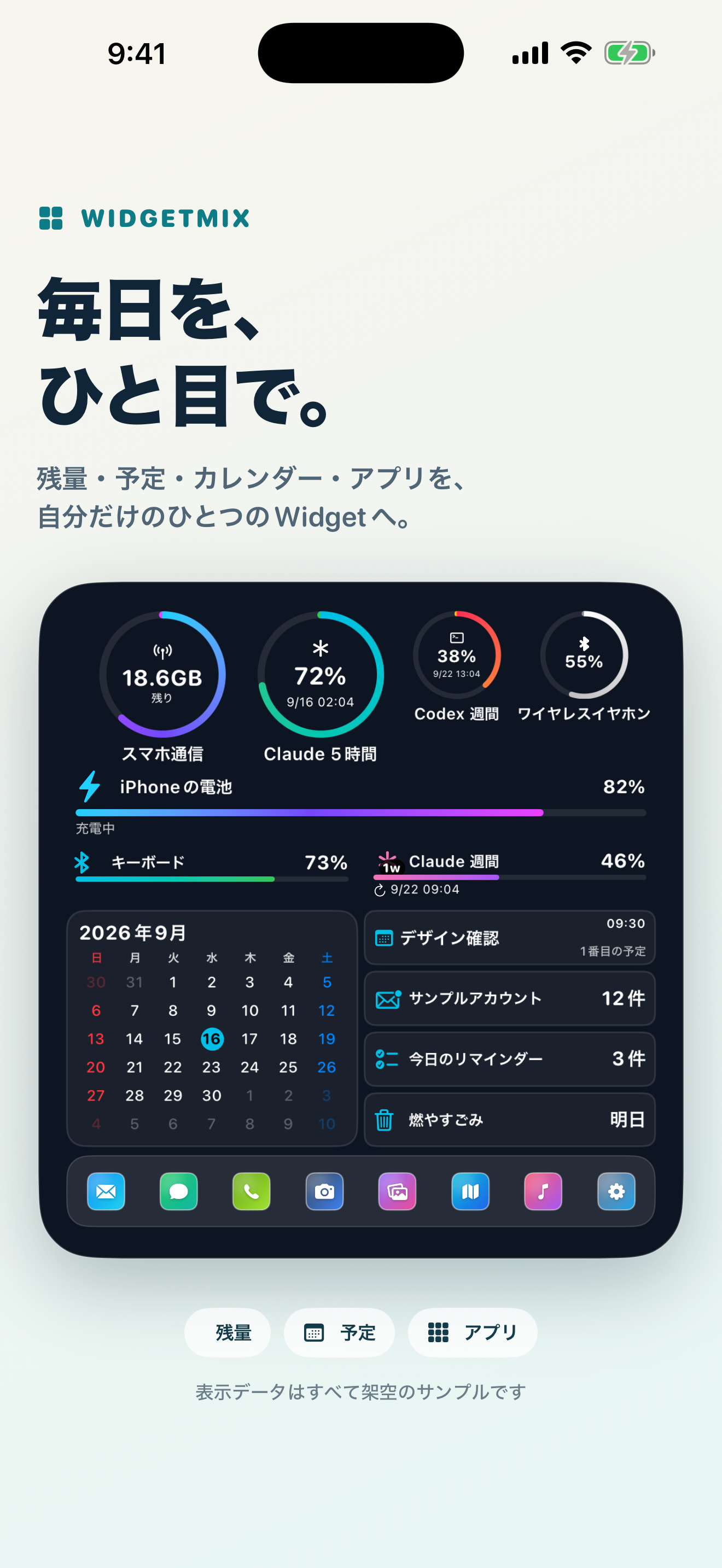
Usage rings, a battery bar, a calendar, and events in one widget. Explore a promotional view rendered with the real widget components and screenshots of the app controls.
Colorful rings for remaining usage, a calendar and cards for events, and shortcuts to your apps—all together.
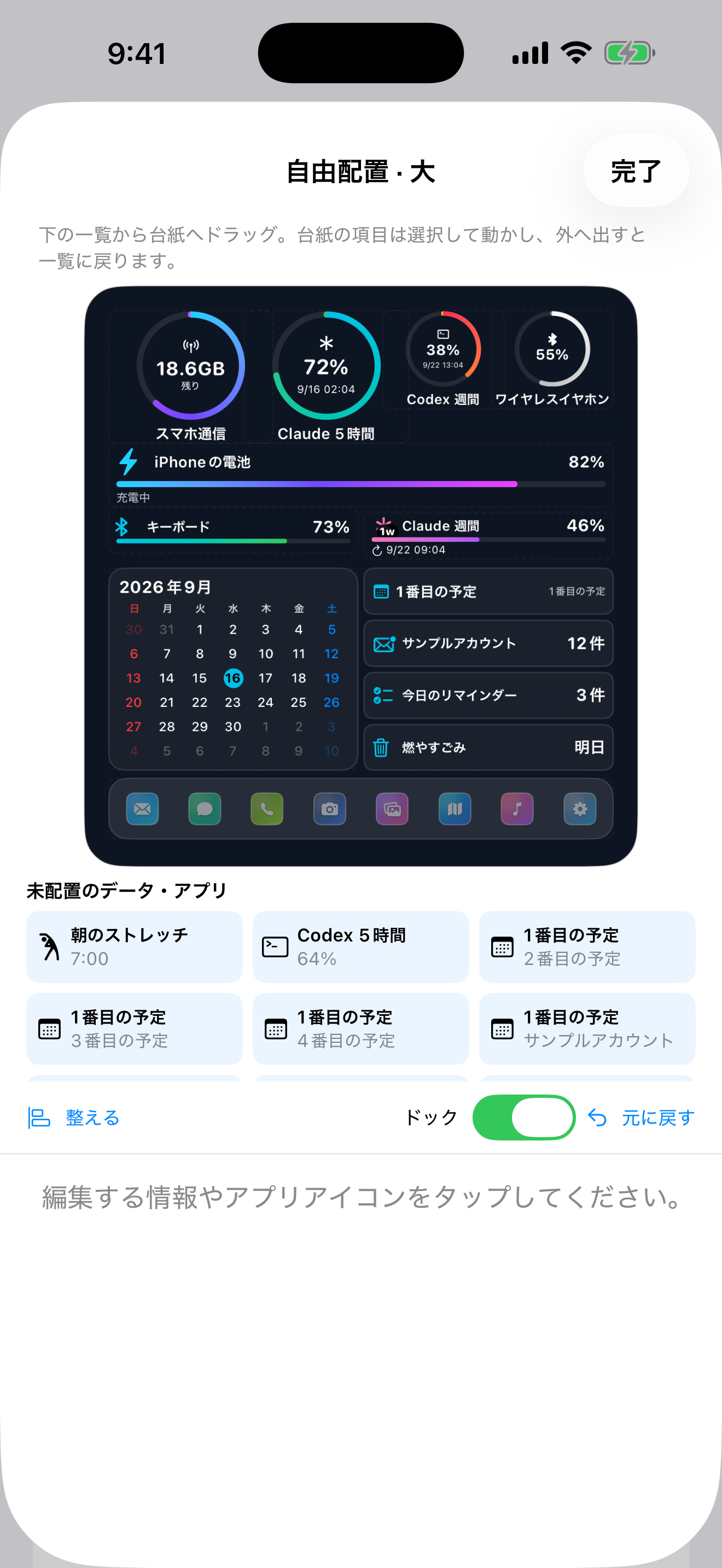
Drag items from the list onto the canvas, then move information and app icons into the positions you prefer.
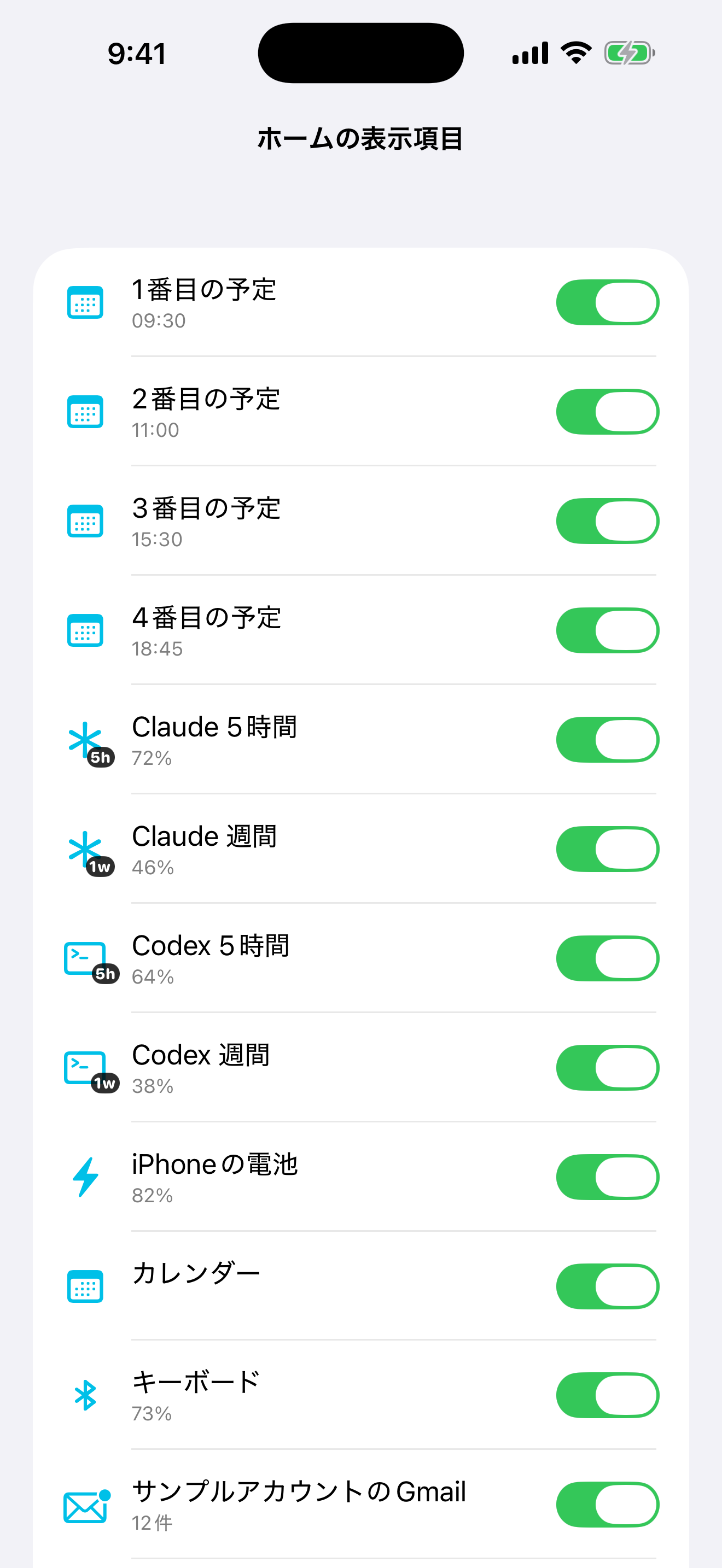
Select schedules, remaining usage, and device information from a list. Use switches to organize what appears on your home dashboard.
Development screenshots and a promotional view captured on September 16, 2026, all with fictional data. Heading and control positions differ in the latest version. Screens are shown in Japanese. Tap an image to view it at full size.
MAKE IT YOURS
Style your widgets with skins, or choose larger text and icons with Senior Mode. Make the look and everyday controls work for you.
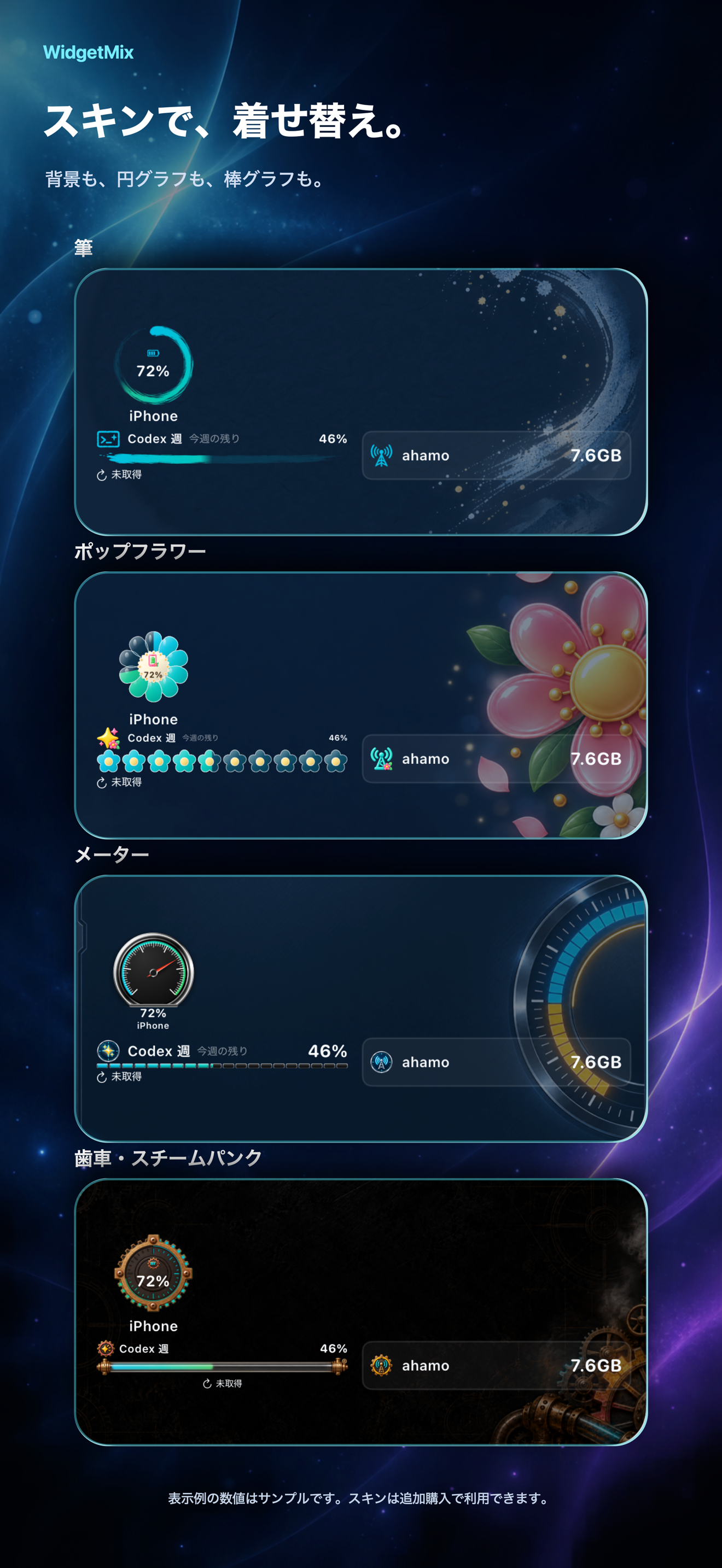
Choose from Brush, Pop Flower, Meter, and Clockwork / Steampunk. Combine a skin with ring or bar displays to give the same information a different look.
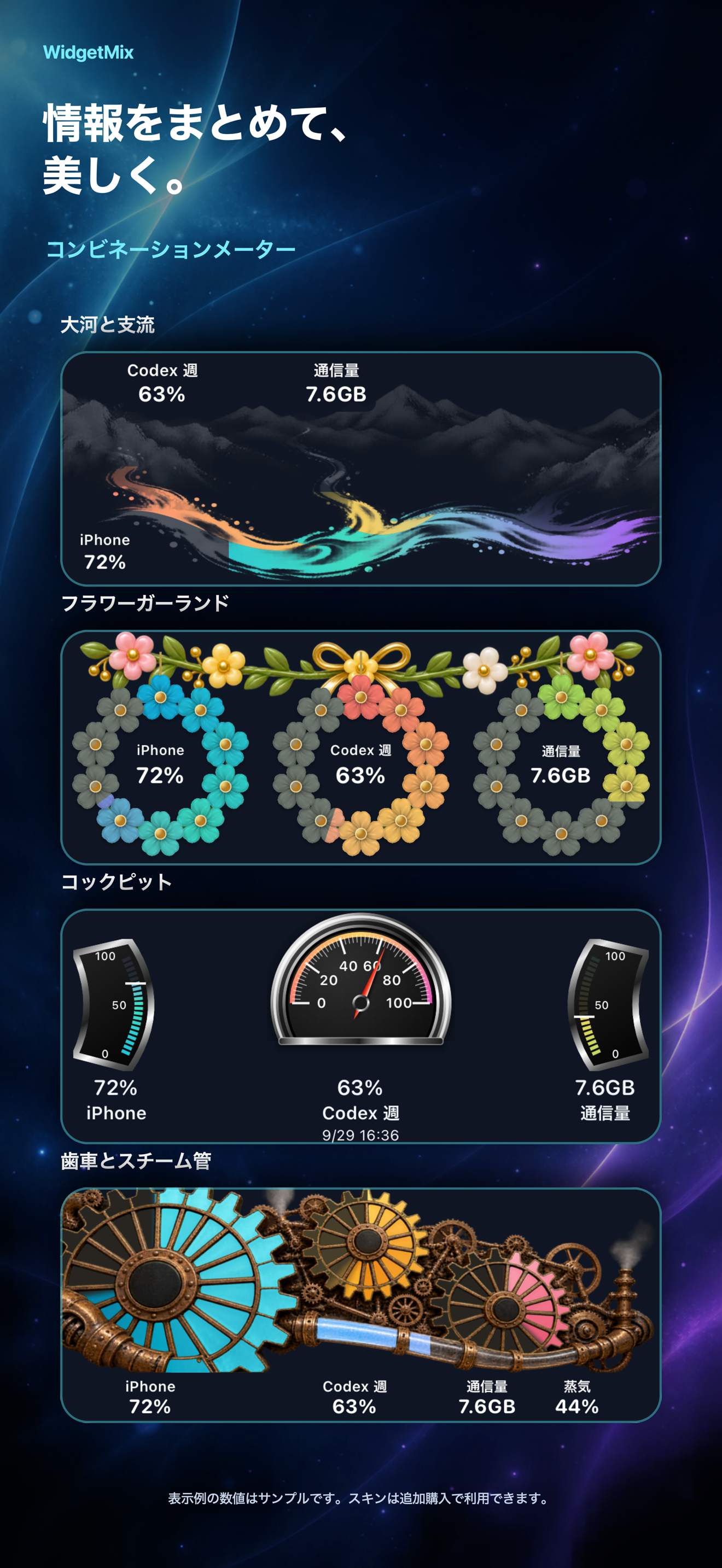
River and tributaries, a flower garland, cockpit instruments, or gears and steam pipes. Combination Graphs bring several usage readings together in one design.
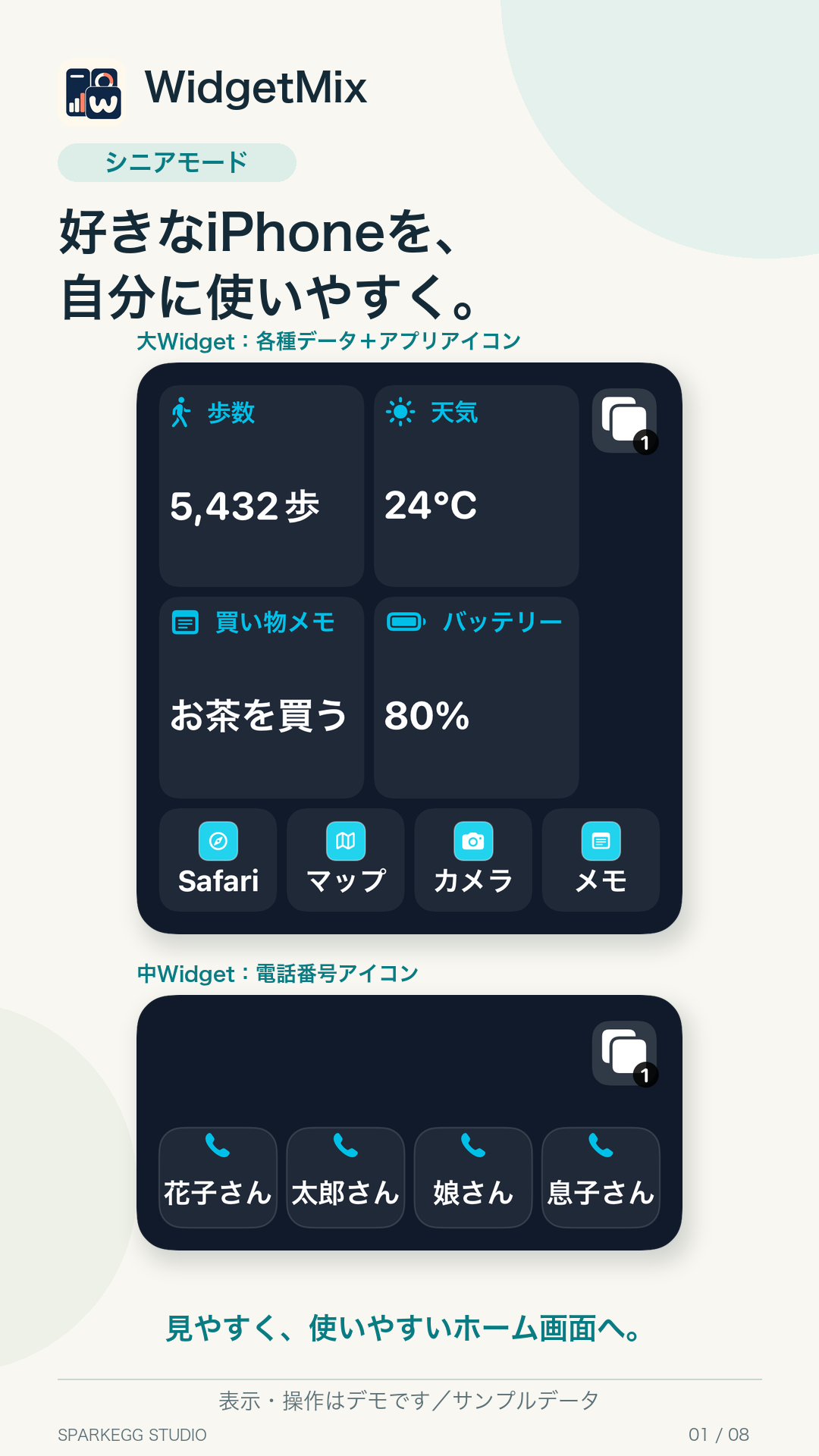
Senior Mode focuses on larger text and icons and a simpler interface. Anyone who prefers this display can choose it, regardless of age.
Use Easy Setup to choose a medium or large widget and the items you need, such as contacts, notes, steps, and weather. Switch between two pages to keep your information and favorite apps together.
A contact icon opens that person's contact details, where you can make a call. Contacts and app shortcuts require an initial setup in Apple's Shortcuts app.
Skin artwork adopted on September 26 and Senior Mode artwork adopted on October 5, 2026. These product-rendered demos use fictional sample data and are shown in Japanese. Skins require an additional purchase. The app is available on the App Store. Tap an image to view it at full size.
WIDGETMIX VIDEOS
Two promotional videos introducing everyday information and an interface that suits you. Video links for this page are being prepared.
Bring usage, schedules, and apps into one widget. Explore layouts, display combinations, and skins.
Video link coming soon
Explore larger text and icons, contacts, notes, steps, and Easy Setup in Senior Mode.
Video link coming soon
Development-version demos with fictional sample data. Screens may differ from the latest version or the distributed app. Both videos are in Japanese and use AI-generated voice and background music.
HOW TO USE WIDGETMIX
Choose a tutorial for Standard Mode, Senior Mode, phone numbers, or app registration. Videos open on YouTube in a new tab.
Add items, arrange the canvas, and adjust graphs and skins.
Watch on YouTubeFollow Easy Setup to choose items, contacts, and apps.
Watch on YouTubeSelect and register contacts, then check your registered list.
Watch on YouTubeRegister an app using suggestions, a launch link, or the app list and search.
Watch on YouTubeRecorded with the October 2026 development version. The app interface is shown in Japanese; narration and background music are AI-generated. Names, contacts and memos are fictional samples. Screens and supported features may change.
정보를 추가하고 자유롭게 배치하며 그래프와 스킨을 설정하는 방법입니다.
YouTube에서 보기간편 만들기에서 표시할 정보, 연락처, 앱을 선택하는 방법입니다.
YouTube에서 보기연락처를 선택해 등록하고 등록된 목록을 확인하는 방법입니다.
YouTube에서 보기앱 후보, 실행 링크, 목록과 검색으로 앱을 등록하는 방법입니다.
YouTube에서 보기2026년 10월 개발 버전으로 제작했으며 앱 화면은 일본어입니다. 한국어 자막과 AI로 만든 배경 음악을 사용하며 음성 해설은 없습니다. 표시된 이름, 연락처, 메모는 가상 데이터입니다. 화면과 지원 기능은 이후 버전에서 달라질 수 있습니다.
介紹新增資訊、自由配置版面,以及圖表與外觀的設定。
在 YouTube 觀看介紹使用簡易設定選擇資訊、聯絡人與應用程式的步驟。
在 YouTube 觀看介紹選取及新增聯絡人,並確認已新增清單。
在 YouTube 觀看介紹透過候選清單、啟動連結或列表搜尋新增 App。
在 YouTube 觀看使用 2026 年 10 月開發版本錄製,應用程式介面為日文。影片提供繁體中文字幕及 AI 生成的背景音樂,不含語音旁白。姓名、聯絡人及備忘錄皆為示範資料;畫面與支援功能可能隨後續版本變更。
WHAT COMES NEXT
We plan to grow WidgetMix into a dashboard for apps developed by SPARKEGG STUDIO. Our direction is to bring selected information—such as blood glucose and blood pressure records, meal and weight logs, and household budgets—from each app into the widgets you see every day.
Integrations with our own apps are planned, not currently available. Supported information and release timing will depend on development progress.
In the widget editor, choose a size, select free layout, and open the canvas editor. Drag items from the unplaced list onto the canvas; drag a card outside to return it to the list. Select an item to adjust its size, graph, palette, or custom colors. Available settings depend on the item.
Arrange separate information in “Second layer 1” and “Second layer 2”, then switch using the layer icons on the widget. App shortcuts open their target apps through WidgetMix.
WidgetMix is available on the App Store. Core features require a monthly plan or a one-time purchase. See the usage guide for details. Apple-issued codes can be entered through “Redeem promotion code” on the Premium screen.
Use all main features—including the dashboard, widgets, and service connections—during a 14-day free trial. Unless you cancel, the trial automatically continues as a paid monthly subscription. You can also choose a one-time purchase instead of the monthly plan.
The free trial is available once per subscription group. Check the App Store purchase screen for availability.
Availability is limited to Japan, the United States, Australia, Canada, South Korea, and Taiwan. The app will not be distributed in the EU. Check the App Store purchase screen for the final local price, trial eligibility, and purchase terms.
The monthly plan renews automatically and the monthly price applies after the free trial. If you do not want to renew, cancel through Apple's subscription management at least 24 hours before the trial or subscription period ends. A one-time purchase does not automatically cancel an existing monthly subscription.
Expiry alone does not delete your settings or saved data, and purchases can be restored. Before purchase and after expiry, the Premium screen still lets you remove Google integration and delete web login data. See the terms and support for details.
Official APIs are preferred where available. Some features for services such as Codex, Claude, and ahamo use an unofficial, on-device method to read a webpage where the user has signed in. Website changes, logout, access restrictions, or changes to a provider's terms may make these features unavailable.
Generic web reading of mobile data allowances is a beta feature. Only ahamo has been tested on a physical device; other carriers are unverified. It uses no official carrier API: you sign in to the carrier’s official website and select a remaining-data candidate from the page. Site layouts or authentication can prevent retrieval. Check the result against the official site when first setting it up and after updates. povo2.0 is currently unsupported.
Our release criteria include completion of primary tasks with VoiceOver, spoken values and states for charts, support for larger text and high contrast, and state communication that does not rely on color alone.